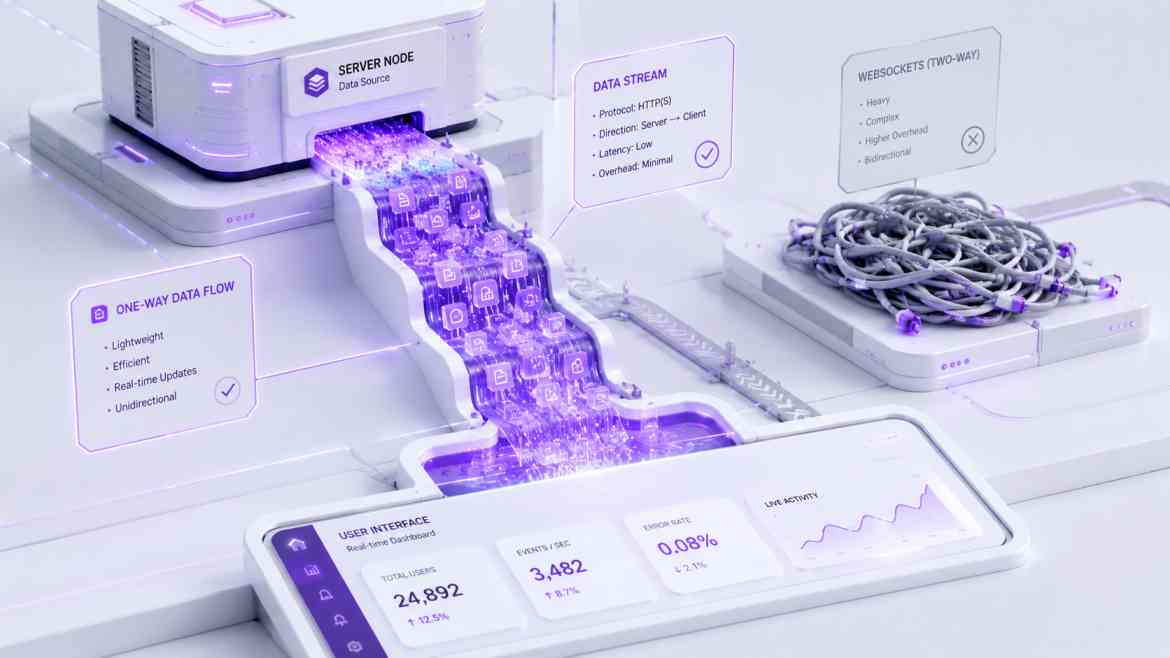
The WebSocket Default Trap
When building a modern B2B SaaS dashboard at Smart Tech Devs, you often need real-time updates. If a background job finishes processing a massive CSV export, you want a notification to instantly pop up on the user's screen. The immediate developer reflex is: "I need WebSockets. Let's install Socket.io or Laravel Reverb."
For a collaborative whiteboard or a live chat application, WebSockets are mandatory because the data is bidirectional (the client and server are constantly talking to each other). But for 90% of SaaS use cases—like notifications, live progress bars, or stock ticker updates—the communication is unidirectional. The server just needs to push data to the client. Using a heavy, persistent WebSocket connection for unidirectional data is absolute overkill, and introduces severe scaling headaches with load balancers and firewalls dropping connections.
The Elegant Alternative: Server-Sent Events (SSE)
Server-Sent Events (SSE) is a native browser API designed specifically for unidirectional, real-time data. Unlike WebSockets, SSE operates entirely over standard HTTP. There are no custom protocols, no complex handshake upgrades, and it leverages native HTTP/2 multiplexing, making it incredibly lightweight and firewall-friendly.
Step 1: Architecting the SSE Route in Next.js
In the Next.js App Router, we can create a dedicated API Route Handler that streams an event response back to the client.
// app/api/notifications/route.ts
import { NextRequest } from 'next/server';

export async function GET(req: NextRequest) {
    // 1. Create a readable stream
    const stream = new ReadableStream({
        async start(controller) {
            const encoder = new TextEncoder();

            // Simulate listening to a Redis Pub/Sub channel or Database Event
            const sendUpdate = (data: any) => {
                // SSE requires a specific format: "data: {json}\n\n"
                const payload = `data: ${JSON.stringify(data)}\n\n`;
                controller.enqueue(encoder.encode(payload));
            };

            // Send an initial connection success message
            sendUpdate({ type: 'connected', message: 'SSE Stream Active' });

            // Example: Push a notification every 10 seconds
            const interval = setInterval(() => {
                sendUpdate({ type: 'notification', message: 'Your export is ready!' });
            }, 10000);

            // Cleanup when the client disconnects
            req.signal.addEventListener('abort', () => {
                clearInterval(interval);
                controller.close();
            });
        }
    });

    // 2. Return the stream with strict SSE HTTP headers
    return new Response(stream, {
        headers: {
            'Content-Type': 'text/event-stream',
            'Cache-Control': 'no-cache, no-transform',
            'Connection': 'keep-alive',
        },
    });
}
Step 2: Consuming the Stream in React
Because SSE is a native browser feature, we don't need any heavy third-party NPM packages on the client. We simply use the built-in EventSource API inside a useEffect hook.
// components/LiveNotifications.tsx
"use client";

import { useEffect, useState } from 'react';

export default function LiveNotifications() {
    const [notifications, setNotifications] = useState<string[]>([]);

    useEffect(() => {
        // 1. Connect to our Next.js SSE endpoint
        const eventSource = new EventSource('/api/notifications');

        // 2. Listen for incoming messages
        eventSource.onmessage = (event) => {
            const data = JSON.parse(event.data);

            if (data.type === 'notification') {
                setNotifications((prev) => [...prev, data.message]);
            }
        };

        // 3. Handle errors and auto-reconnect logic (built into EventSource naturally!)
        eventSource.onerror = () => {
            console.error("SSE connection lost. Reconnecting...");
        };

        // 4. Cleanup the connection when the component unmounts
        return () => {
            eventSource.close();
        };
    }, []);

    return (
        <div className="notification-panel">
            <h3>Live Updates</h3>
            <ul>
                {notifications.map((note, idx) => (
                    <li key={idx}>{note}</li>
                ))}
            </ul>
        </div>
    );
}
The Engineering ROI
By migrating your unidirectional real-time features to Server-Sent Events, you dramatically reduce your infrastructure complexity. You no longer need to manage sticky sessions on load balancers or worry about corporate firewalls blocking ws:// traffic. You get native auto-reconnection and standard HTTP caching rules, allowing your team to build real-time features faster and more reliably.