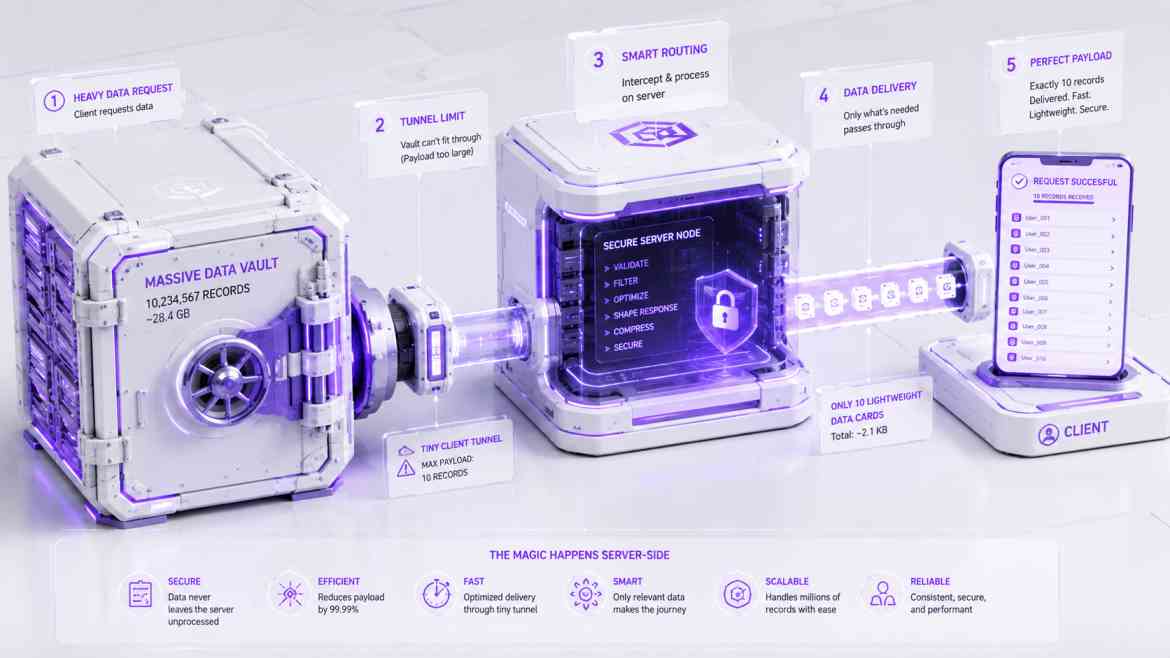
The Client-Side Fetching Disaster
Data tables are the most common UI element in any B2B SaaS dashboard. When tasked with building a "Client Roster" grid, many React developers reach for heavy client-side libraries. They fetch all 5,000 client records from the API, store them in a massive useState array, and let the browser's JavaScript engine handle the sorting, filtering, and pagination.
For 100 rows, this is blazing fast. For 50,000 rows, this architecture is a disaster. You force the user to download a 5MB JSON payload. Their browser tab consumes massive amounts of RAM, the UI stutters during sorting, and mobile devices completely crash. At Smart Tech Devs, we never send unnecessary data to the client. We architect Server-Side Data Grids using Next.js Server Components.
The Architecture: URL-Driven Server Components
To build a high-performance grid, the database must do the heavy lifting. The frontend's only job is to update the URL parameters. The Next.js Server Component reads those parameters, executes a highly optimized SQL query (with LIMIT and OFFSET), and sends exactly 10 rows of pure HTML to the browser.
Step 1: The Server Component Core
In the Next.js App Router, the page.tsx automatically receives the searchParams from the URL. We pass these directly to our database fetcher.
// app/dashboard/clients/page.tsx
import { Suspense } from 'react';
import db from '@/lib/db';
import ClientTable from './components/ClientTable';
import TableSkeleton from './components/TableSkeleton';

export default async function ClientsPage({
    searchParams,
}: {
    searchParams: { q?: string; sort?: string; page?: string };
}) {
    // 1. Extract URL state with safe defaults
    const query = searchParams?.q || '';
    const sort = searchParams?.sort || 'created_at_desc';
    const currentPage = Number(searchParams?.page) || 1;
    const perPage = 10;

    // 2. Perform the heavy lifting securely on the server
    const clients = await db.client.findMany({
        where: {
            name: { contains: query, mode: 'insensitive' },
        },
        orderBy: {
            [sort.split('_')[0]]: sort.split('_')[1], // e.g., created_at: 'desc'
        },
        skip: (currentPage - 1) * perPage,
        take: perPage,
    });

    const totalCount = await db.client.count({
        where: { name: { contains: query, mode: 'insensitive' } }
    });

    return (
        <main>
            <h1>Client Roster</h1>
            <Suspense fallback={<TableSkeleton />}>
                {/* We pass ONLY the 10 rows of data to the UI component */}
                <ClientTable data={clients} totalPages={Math.ceil(totalCount / perPage)} />
            </Suspense>
        </main>
    );
}
Step 2: The Client Component UI
The ClientTable component doesn't need to know how to sort data. It just needs to update the browser URL when a user clicks a column header. Next.js will automatically re-run the Server Component and stream the new rows in.
// app/dashboard/clients/components/ClientTable.tsx
"use client";

import { useRouter, usePathname, useSearchParams } from 'next/navigation';

export default function ClientTable({ data, totalPages }) {
    const router = useRouter();
    const pathname = usePathname();
    const searchParams = useSearchParams();

    const handleSort = (column: string) => {
        const params = new URLSearchParams(searchParams);

        // Toggle sort direction
        const currentSort = params.get('sort');
        const newSort = currentSort === `${column}_asc` ? `${column}_desc` : `${column}_asc`;

        params.set('sort', newSort);
        router.push(`${pathname}?${params.toString()}`);
    };

    return (
        <table className="w-full">
            <thead>
                <tr>
                    <th onClick={() => handleSort('name')} className="cursor-pointer">Name ↕</th>
                    <th onClick={() => handleSort('status')} className="cursor-pointer">Status ↕</th>
                </tr>
            </thead>
            <tbody>
                {data.map(client => (
                    <tr key={client.id}>
                        <td>{client.name}</td>
                        <td>{client.status}</td>
                    </tr>
                ))}
            </tbody>
        </table>
    );
}
The Engineering ROI
By keeping data grids server-side, you completely decouple your frontend performance from the size of your database. Whether your client has 100 customers or 10 million, the browser only ever downloads exactly 10 rows of data. This guarantees a blazing-fast, crash-proof user experience on any device.