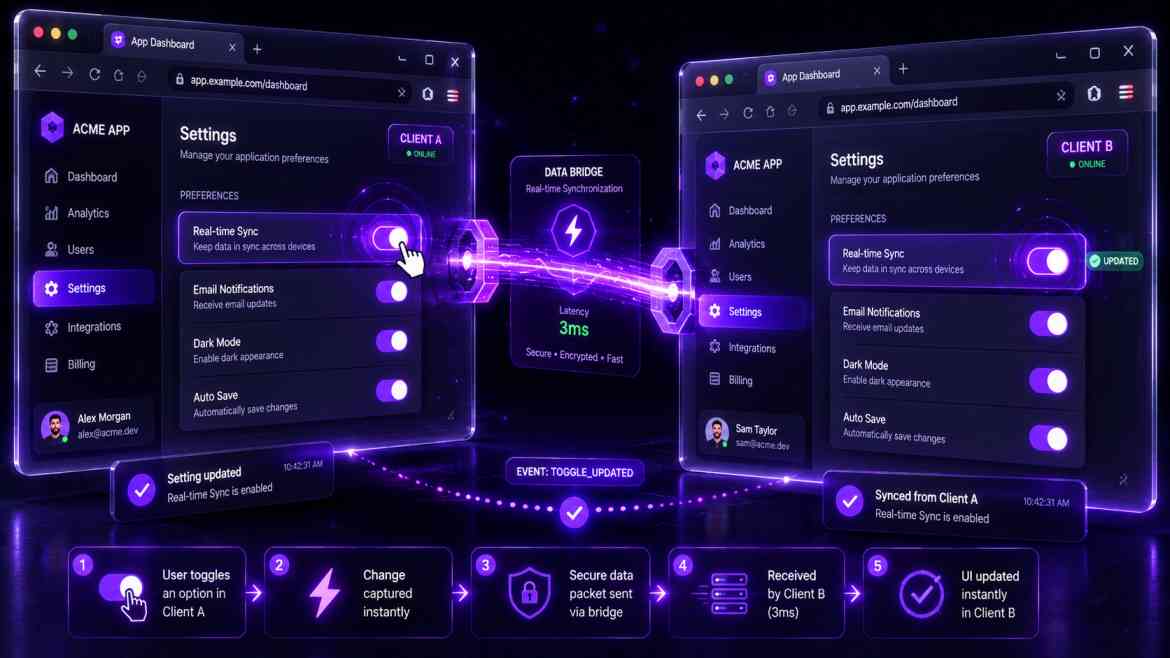
The Cross-Tab Desync Problem
In modern SaaS web environments at Smart Tech Devs, enterprise power-users frequently operate with multiple browser tabs open to your application simultaneously. They might have a billing statement open in Tab A and a user workspace settings panel open in Tab B.
A frustrating user experience occurs when a user triggers a global state mutation—such as logging out, switching corporate tenant contexts, or updating a primary theme—in Tab B, but Tab A remains completely oblivious to the change. The user navigates back to Tab A, attempts to complete an operation, and encounters abrupt validation failures or unhandled session errors because the underlying authentication state desynchronized under the hood. To provide a coherent multi-tab workspace layout, you must implement the browser's native BroadcastChannel API.
What is the BroadcastChannel API?
The BroadcastChannel API is a lightweight, ultra-fast web standard that allows separate browser contexts (tabs, iframes, or web workers) originating from the same domain to instantly exchange text strings or state messages.
Unlike polling mechanisms or local storage event listeners (which can experience minor delays or write overhead), a Broadcast Channel provides a direct, low-latency publish-subscribe channel operating entirely in local client memory. When a state shift occurs in one tab, it broadcasts a small event notification token, allowing all other open tabs to catch up instantly.
Building a Reusable Cross-Tab Synchronization Hook
Let's design a custom React hook that initializes a dedicated channel connection, synchronizing state modifications smoothly without causing redundant loops.
// hooks/useCrossTabState.ts
"use client";

import { useState, useEffect, useRef } from 'react';

export function useCrossTabState<T>(channelName: string, initialValue: T) {
    const [state, setState] = useState<T>(initialValue);
    const channelRef = useRef<BroadcastChannel | null>(null);

    useEffect(() => {
        // 1. Establish the native browser communications link
        const channel = new BroadcastChannel(channelName);
        channelRef.current = channel;

        // 2. Listen for state updates broadcasted from OTHER open tabs
        const handleMessage = (event: MessageEvent) => {
            setState(event.data as T);
        };

        channel.addEventListener('message', handleMessage);

        return () => {
            // Securely close communication lines during component teardown
            channel.removeEventListener('message', handleMessage);
            channel.close();
        };
    }, [channelName]);

    // 3. Contextual Wrapper function: Updates local state AND tells other tabs
    const setSharedState = (newValue: T) => {
        setState(newValue);

        // Broadcast the update payload across all other tabs instantly
        if (channelRef.current) {
            channelRef.current.postMessage(newValue);
        }
    };

    return [state, setSharedState] as const;
}
Implementing the Shared Hook inside your React Workspace
Now we consume the hook inside our global modules, guaranteeing that actions taken anywhere across the browser container sync up instantly.
// components/dashboard/WorkspaceSelector.tsx
"use client";

import React from 'react';
import { useCrossTabState } from '@/hooks/useCrossTabState';

export default function WorkspaceSelector() {
    // Both tabs lock into the exact same channel instance name
    const [activeWorkspace, setActiveWorkspace] = useCrossTabState('saas_workspace_sync', 'default_team');

    return (
        <div className="p-4 bg-white border rounded-xl shadow-sm max-w-sm">
            <h4 className="font-bold text-gray-800 text-sm mb-2">Active Context Frame</h4>
            Current Segment: {activeWorkspace}

            <select
                value={activeWorkspace}
                onChange={(e) => setActiveWorkspace(e.target.value)}
                className="w-full p-2 text-sm border rounded bg-gray-50 focus:ring-2 ring-purple-500"
            />
                <option value="default_team">Default Corporate Team</option>
                <option value="billing_isolated">Accounting & Billing Dept</option>
                <option value="dev_sandbox">Engineering Sandbox Environment</option>
            </select>
        </div>
    );
}
The Client Synchronization ROI
By leveraging the BroadcastChannel engine across session critical configurations, your fronted environment behaves like a singular unified application rather than disjointed separate tabs. Security risks drop because user identity or scope state changes apply globally in real-time, delivering a solid native-feeling interface that handles multi-window behaviors cleanly.