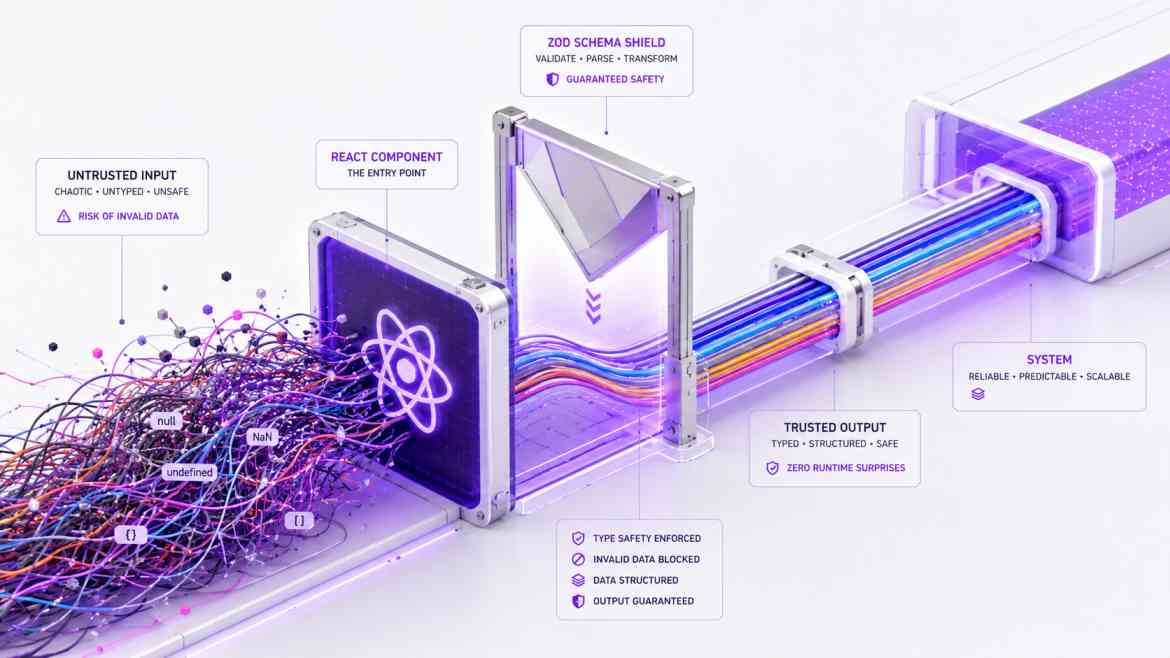
The Controlled Component Disaster
Forms are the most critical interactive elements in any B2B SaaS. Yet, the standard way junior developers build forms in React is an architectural nightmare. They use "Controlled Components", binding every single <input> to a useState hook.
If you have a complex enterprise registration form with 20 fields, typing a single letter in the "First Name" field triggers a state update, causing the entire 20-field form component to re-render. Typing a 10-letter name forces 10 full re-renders. Furthermore, developers write messy, manual validation logic (if (!email.includes('@')) ...), which is brittle and completely lacks TypeScript safety. To build elite frontends at Smart Tech Devs, we must decouple form state from React renders using React Hook Form and guarantee type safety using Zod.
The Solution: Uncontrolled Inputs & Schema Validation
React Hook Form (RHF) leverages "Uncontrolled Inputs" using HTML refs. When a user types, the data is stored in the DOM, not in React state. The form only re-renders when absolutely necessary (like showing an error). Zod is a TypeScript-first schema declaration library that perfectly defines what shape your data must take.
Step 1: Defining the Zod Schema
We create a single source of truth for our data shape. This schema acts as both our runtime validation logic and our compile-time TypeScript interface.
// lib/validations/user.ts
import { z } from 'zod';

export const userRegistrationSchema = z.object({
    email: z.string().email("Please enter a valid corporate email."),
    companyName: z.string().min(3, "Company name must be at least 3 characters."),
    employeeCount: z.coerce.number().min(1, "Must have at least 1 employee."),
    password: z.string().min(12, "Password must be at least 12 characters.")
});

// Automatically extract the TypeScript Type from the schema!
export type UserRegistrationFormValues = z.infer<typeof userRegistrationSchema>;
Step 2: Architecting the High-Performance Form
We bind React Hook Form to our Zod schema using the zodResolver. RHF handles the high-performance DOM refs, while Zod acts as the strict security bouncer.
// components/forms/RegistrationForm.tsx
"use client";

import { useForm } from 'react-hook-form';
import { zodResolver } from '@hookform/resolvers/zod';
import { userRegistrationSchema, UserRegistrationFormValues } from '@/lib/validations/user';

export default function RegistrationForm() {
    // 1. Initialize the form with the Zod resolver
    const {
        register,
        handleSubmit,
        formState: { errors, isSubmitting }
    } = useForm<UserRegistrationFormValues>({
        resolver: zodResolver(userRegistrationSchema),
        mode: 'onBlur', // Validate fields when the user clicks away
    });

    // 2. This function ONLY runs if the Zod schema validation passes perfectly
    const onSubmit = async (data: UserRegistrationFormValues) => {
        // 'data' is 100% type-safe here. data.employeeCount is guaranteed to be a Number.
        await fetch('/api/register', { method: 'POST', body: JSON.stringify(data) });
    };

    return (
        <form onSubmit={handleSubmit(onSubmit)} className="max-w-md p-6 bg-white rounded-xl shadow border">
            <h3 className="text-xl font-bold mb-4">Create Workspace</h3>

            <div className="mb-4">
                <label className="block text-sm font-medium mb-1">Corporate Email</label>
                {/* 3. 'register' wires up the uncontrolled ref natively */}
                <input
                    {...register('email')}
                    className="w-full p-2 border rounded"
                />
                {errors.email && <p className="text-red-500 text-xs mt-1">{errors.email.message}</p>}
            </div>

            <div className="mb-6">
                <label className="block text-sm font-medium mb-1">Employee Count</label>
                <input
                    type="number"
                    {...register('employeeCount')}
                    className="w-full p-2 border rounded"
                />
                {errors.employeeCount && <p className="text-red-500 text-xs mt-1">{errors.employeeCount.message}</p>}
            </div>

            <button
                type="submit"
                disabled={isSubmitting}
                className="w-full bg-purple-600 text-white p-2 rounded disabled:opacity-50"
            >
                {isSubmitting ? 'Provisioning...' : 'Deploy Workspace'}
            </button>
        </form>
    );
}
The Engineering ROI
By decoupling form state from React's rendering lifecycle, your large enterprise forms become buttery-smooth, with zero input lag on low-end devices. By incorporating Zod, you eliminate human error in validation logic, achieving absolute end-to-end type safety between your frontend components and your backend API expectations.