The Reporting Bottleneck
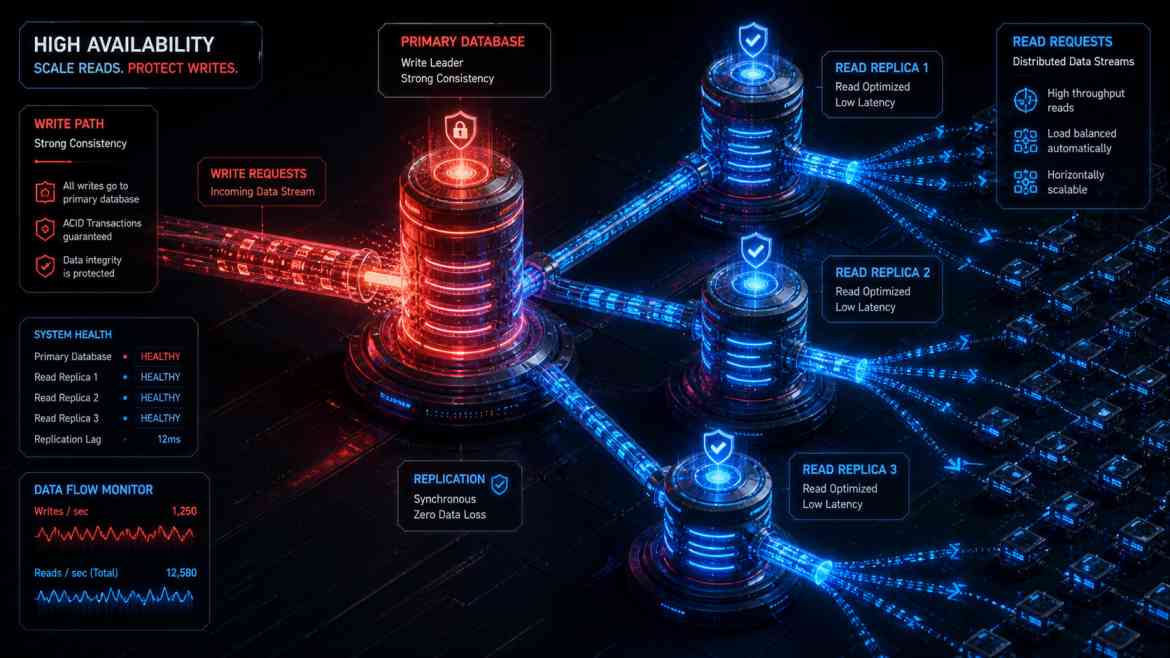
As your B2B SaaS platform at Smart Tech Devs matures, the ratio of database reads to writes becomes heavily skewed. While users only occasionally insert or update data (writes), they constantly load dashboards, generate complex analytics, and export massive CSV reports (reads). If you rely on a single primary PostgreSQL database, heavy analytical queries will consume all available CPU and RAM. When this happens, simple INSERT operations (like a user trying to sign up) are forced into a queue, resulting in API timeouts and a paralyzed application.
To architect for massive scale, we must physically separate our traffic. We direct all inserts, updates, and deletes to a Primary (Write) Database, and we offload all complex SELECT queries to one or more Read Replicas.
Architecting Read/Write Splitting in Laravel
PostgreSQL and cloud providers (like AWS RDS or DigitalOcean) make spinning up a Read Replica a one-click process. The replica continuously synchronizes with the primary database. The challenge is teaching your application how to route the traffic.
Fortunately, Laravel handles this natively with incredible elegance. You do not need to rewrite your Eloquent queries. You simply configure your config/database.php file to define the split.
Step 1: The Database Configuration
// config/database.php

'pgsql' => [
    'driver' => 'pgsql',

    // 1. Define the Primary (Write) Connection
    'write' => [
        'host' => [env('DB_HOST_PRIMARY', '127.0.0.1')],
    ],

    // 2. Define the Read Replicas (You can add multiple for load balancing)
    'read' => [
        'host' => [
            env('DB_HOST_REPLICA_1', '127.0.0.1'),
            env('DB_HOST_REPLICA_2', '127.0.0.1'),
        ],
    ],

    // 3. Prevent the "Stale Data" problem (CRITICAL)
    'sticky' => true,

    // Shared credentials for both read and write databases
    'port' => env('DB_PORT', '5432'),
    'database' => env('DB_DATABASE', 'forge'),
    'username' => env('DB_USERNAME', 'forge'),
    'password' => env('DB_PASSWORD', ''),
    'charset' => 'utf8',
    'prefix' => '',
    'schema' => 'public',
    'sslmode' => 'prefer',
],
Solving Replication Lag with the "Sticky" Flag
There is a physical reality to Read Replicas: Replication Lag. It takes a few milliseconds (or seconds under heavy load) for a write on the Primary database to copy over to the Read Replica.
Imagine a user updates their company name and clicks "Save". Laravel writes to the Primary DB, then redirects the user back to the dashboard. The dashboard instantly performs a SELECT query, which routes to the Read Replica. Because of the 100ms replication lag, the Read Replica hasn't received the update yet. The user sees their old company name and assumes your app is broken.
By simply setting 'sticky' => true in Laravel's config, the framework implements a brilliant safety net. If a write operation is performed during the current HTTP request cycle, Laravel temporarily forces all subsequent read queries in that same request cycle to hit the Primary database. This completely eliminates the stale data UX bug while still routing 99% of your global read traffic to the replicas.
Conclusion
Scaling a database isn't always about writing better SQL; it is often about infrastructure routing. By implementing Read Replicas and leveraging Laravel's native read/write splitting with sticky sessions, you protect your primary database from analytical exhaustion, ensuring your B2B SaaS remains blazingly fast under massive enterprise load.